
ON THE GO
Say it. Plana sorts it.
Tomorrow’s appointment, Thursday’s meeting, what you need to handle today. Say it your way without entering each commitment separately.
Say your commitments once. Plana organizes dates and times for you to review and save to iPhone Calendar and Reminders.

It is rarely a lack of motivation. Each commitment means opening an app, typing and choosing a time.
You book an appointment on the phone, plan to write it down later and the day moves on. What is not recorded right away is easy to lose.
Title, date, time, duration, location. That is a lot of work for something you can say in ten seconds.
If getting organized means learning a new system, that system is abandoned within days.
What Plana solves
You keep using iPhone Calendar and Reminders. Plana handles the tedious part: turning what you said into events ready to save.
The difference is how many steps it takes to go from deciding to having a commitment saved.
You do not need to speak in a certain format or remember every detail.
"Tomorrow at 8 workout, call John on Thursday, Pedro’s appointment on the 25th at 2 PM"
No fixed format. Say it the way you would tell someone.
Plana separates each commitment with its date, time and duration
You can edit any field before saving.
One tap sends everything to iPhone Calendar and Reminders
Commitments in Calendar, tasks in Reminders.
One step instead of several: speaking takes seconds; filling in fields is what usually gets in the way.
The result is right there: your commitments are ready before you lose momentum.
Nothing new to learn: everything stays in the iPhone apps you already use.
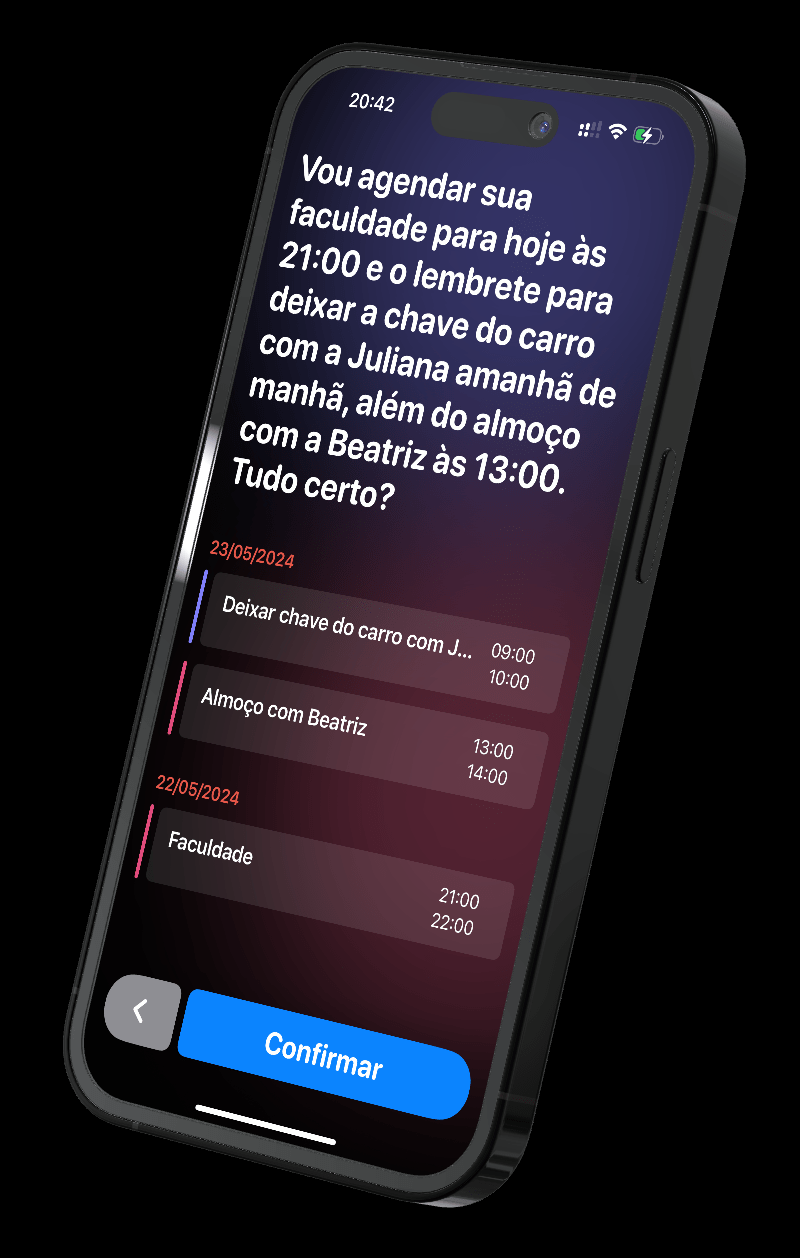
Tomorrow’s appointment, Thursday’s meeting, what you need to handle today. Say it your way without entering each commitment separately.

Review dates, times and reminders together. Make any changes, then confirm to save.

See your commitments in time order and decide what comes next. Your day is there without rebuilding your schedule.
When life is busy, it is easy to put off writing things down. With Plana, speak what you need to do, review the details and save everything for later.
See how it worksTap Plan and try it: “Tomorrow I have a meeting at 10 AM and need to call the garage at 2 PM.”
Browser demo. Nothing is saved to your calendar.
Mention several commitments at once. Plana separates the details for you.
Review the result and make changes before saving. You decide what belongs in your schedule.
Commitments go to Calendar and tasks to iPhone Reminders, so your routine stays the same.

Between commitments, tell your Apple Watch what you need to do. Review the result and save it to keep going. In a car, use it only while parked.
Apple Watch is available with Plana Plus.Capture tasks as they come up.
Use a spare moment to say what you need to do.
Check what you organized and choose the next step.
Tools to help you remember, start and keep going at your own pace.
For something that cannot wait, set an alarm that rings at the scheduled time.
Messages based on your commitments to help you get started and keep going.
See what is next without opening the app.
Notifications to plan in the morning or evening, always under your control.
See how many plans you have made and follow your organizing habit.
Adjust times, preferences and nudges to fit your routine.
Use the intelligence built into iPhone to organize commitments on device when available.
 ONE THING. DONE WELL.
Start with tomorrow’s commitments. Say it, review it and save it for when you need it.
Free to start · iPhone with iOS 18.6 or later
Follow every word on screen, in Portuguese or English.
Commitments go to the Calendar and Reminders you already use, including iCloud and Google accounts.
If Plana understands something differently, correct it before saving.
A morning or evening notification so planning does not get left behind. You can turn it off.
On iPhones with Apple Intelligence, Plana writes a short message about your day, processed on device (iOS 18.2 or later).
Start planning from a widget or the Lock Screen without opening the app.
You do not need to be formal or follow an order.
"Tomorrow at 8, schedule a one-hour chest workout and remind me to bring water"
"Call John on Thursday morning about the estimate"
"Pedro’s pediatrician appointment at Hospital X on the 25th at 2 PM"
"English class every Monday at 7 PM for 90 minutes"
"Remind me tomorrow morning to pay the condo fee"
"Set aside 30 minutes late this afternoon to review emails"
Download for free and subscribe whenever you want advanced features.
For trying it out and lighter routines
R$ 0
More ways to organize your routine
R$ 14,90 per month
or R$ 149.00 per year, equivalent to R$ 12.42 per month
Subscriptions are billed by the App Store and can be canceled anytime in iPhone Settings. Choose your plan inside the app.
Transcription uses iPhone voice recognition and works offline. AI organization needs an internet connection.
Yes. Events and reminders are created in the native apps through EventKit, in the same calendars and lists you already use.
It can happen, especially with unclear names and times. That is why the review screen comes before saving: you can correct it there.
Yes. Set up your Google account on iPhone and choose its calendar as the default. Plana can save there.
Plana works on iOS 18.6 or later. The Apple Intelligence daily message requires iOS 18.2 or later.
Not yet. Plana depends on native iPhone features such as Apple Calendar and Reminders. Other platforms may be considered later.
Not to get started: the free plan allows 5 plans per day. Plana Plus includes longer recordings, our most advanced AI, unlimited tasks, themes, assistant voices and the Apple Watch app. Billing is handled by the App Store and cancellation is in iPhone Settings.
Events and reminders are created in the native apps. We do not store the contents of your schedule.
You control permissions at any time.
Transcription uses iPhone Speech Recognition.
Learn more in our Privacy Policy
Say what you need to do today and see it in Calendar.
Free to start. Plana Plus at R$ 14.90 per month or R$ 149.00 per year.